Your health is a trajectory.
See where yours is going.

Your wearable sees the numbers. You know the context (the meals, the hard weeks, what you're actually trying to change). Vitanzo reads both together and tells you, in plain language, what that pattern shows.

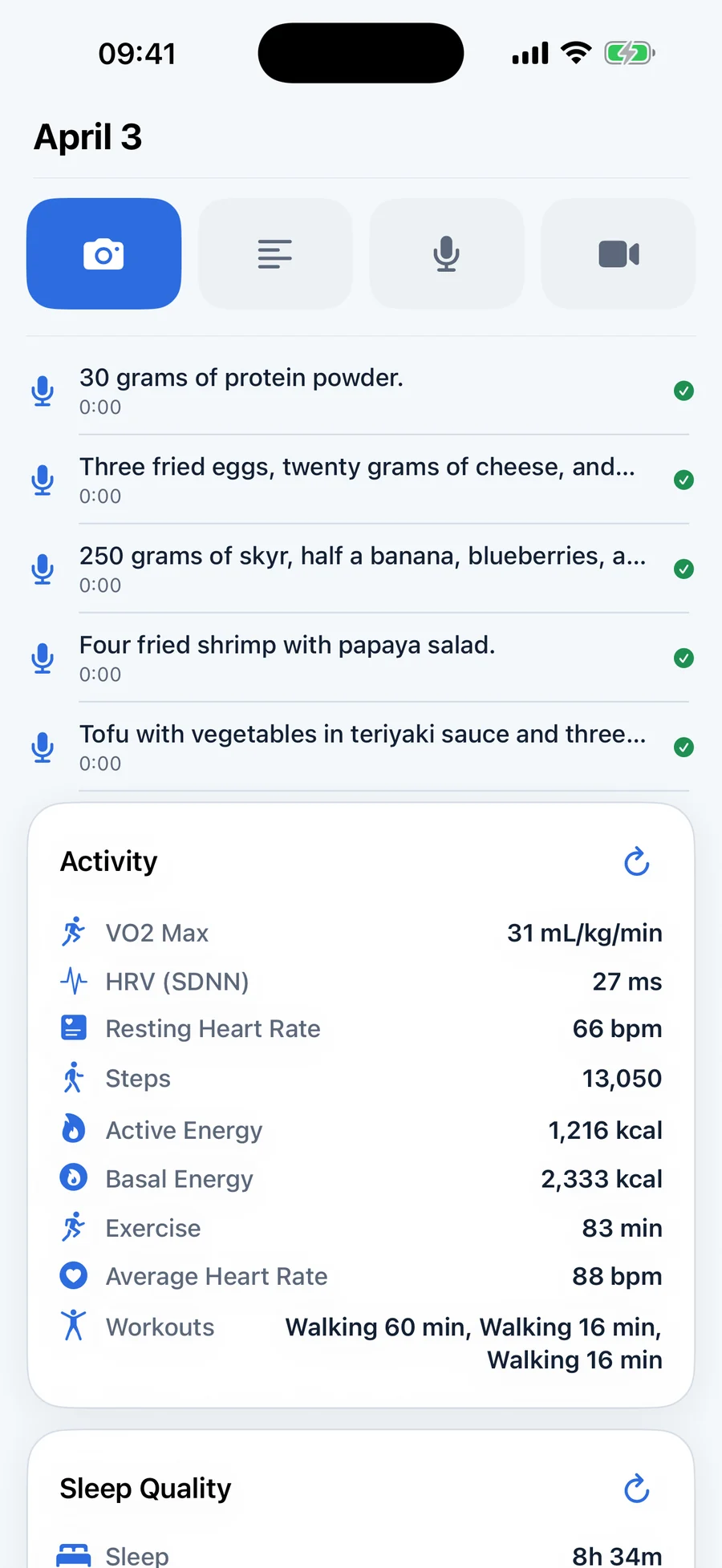
Vitanzo iPhone screenshot showing a daily log with meal entries, voice notes, and Apple Health activity data.
Apple Health
Apple Watch
Oura Ring
Whoop
Withings
Garmin
On-device · No account
The problem

Most health apps give you more numbers. That's not what's missing.

You open your wearable app. Sleep score: 72. HRV: 48. Resting heart rate: 54. And you still don't know why last Tuesday felt sharp and this Tuesday doesn't. The numbers changed. You changed. But nothing connects them.

Wearables are very good at measuring. They are not built to interpret. They don't know about the three difficult meetings, the late dinner, the fact that you've been training harder than usual for two weeks. Without that context, the metrics are half the story. An incomplete story is often harder to act on than no story at all.

"The data doesn't explain itself. No amount of charts changes that."
The horizon

Vitanzo earns its value in the sixth month, not the first session.

Day one gives you a starting point. Month six gives you something to act on: by then, the app has seen your patterns across workouts, travel, illness, and the weeks in between. This is a product built to be used for years, not days.

Vitanzo is an iOS health companion app for people who take their health seriously as a multi-year project. It reads health metrics (including HRV, sleep, resting heart rate, and VO2 max) from Apple Health, and works with Apple Watch, Oura Ring, Whoop, and Garmin. Users add their own context each day (meals, notes, voice memos), and Vitanzo generates a plain-language observation of what the combined data is showing, over days, weeks, and months. Data is stored on-device only. Vitanzo is currently available in Early Access on TestFlight. It is not a medical device.

How it works

Three steps. One clear picture.

Sleep, nutrition, and movement are where the pattern lives. You add your context each day. Vitanzo reads it alongside your wearable data, then tells you what it noticed.

01

Add what your wearable can't see.

Photos of meals. A voice note about how a workout actually felt. A short written note about what was stressful. This is the context that turns sensor data from numbers into a story. Your activity and sleep data arrives from Apple Health automatically. You add the human layer.

Vitanzo daily log on iPhone showing meal entries, voice notes, and Apple Health data in one timeline.
02

A minute. A few questions. Done.

When you're done for the day, a short sheet slides up. A couple of questions about how you felt, drawn from what the app actually sees in your data that day. Then you close it. That triggers the analysis.

Vitanzo iPhone screenshot showing daily health insights based on Apple Health metrics and personal observations.
03

Plain language. Built from your data, not a population average.

The analysis reads like a note from someone who actually knows you. It observes what the numbers suggest. It does not tell you what to do. After a few weeks, it starts noticing patterns you wouldn't catch yourself.

Vitanzo progress screen on iPhone showing 30-day trends for consistency, workouts, and activity.
"The longer you use it, the more it notices. After two weeks of consistent daily entries, the analysis starts drawing on patterns across days, not just what happened yesterday."
Memory

Most tools read yesterday. Vitanzo reads what has accumulated since you started.

The day log from three weeks ago is still there, and so is last month's weekly reflection. So is what you wrote about the work trip that shifted your meals, or the stomach bug that threw off your sleep. Every analysis carries that history with it, which is why patterns only become visible after weeks. Forgetting is also a first-class feature: you can inspect and erase what the app remembers, individually or in bulk.

What's in the app

Everything it takes to turn your data into understanding.

These are the features in Vitanzo right now, as of April 2026.

Daily log

A personal daily journal for the things that shape how you feel: meals, movement, habits, stress, symptoms, and the good parts too. Add photos, voice notes, or written entries while Apple Health data fills in automatically.

Daily analysis

After you close a day, the app generates a short written observation structured around what you ate, how you moved, and your recovery signals. The analysis is observational: it notices patterns, it does not prescribe actions. Requires your own OpenAI API key.

Weekly reflection and summary

At the end of each week, a short set of open questions prompts you to reflect on the week. Your answers, combined with that week's completed days, generate a weekly summary: a broader view of what the week suggested.

Trends

A Progress view showing your Apple Watch health insights over a month, quarter, or year: HRV, resting heart rate, sleep, steps, and more. Includes consistency statistics and a breakdown of your workout patterns.

Longitudinal memory

The analysis carries memory: the last 14 completed days in full, plus compressed weekly summaries reaching back 90 days. This is what allows the system to notice patterns over weeks, not just respond to yesterday's data.

Apple Fitness share extension

Import workouts directly from the Fitness app into your day's log. Shipped in March 2026.

"Always Remember" context

Store up to five persistent notes in Settings. Things you want the analysis to always know: a training goal, a dietary approach, a recent change in routine. These are included in every analysis.

Export

Export your day entries and health data as a JSON file from the Progress screen. Your data is yours. You keep it, and you can take it with you.

Recovery Readiness

The app also calculates a Recovery Readiness score from HRV, resting heart rate, and sleep, placing each day in one of four tiers (High, Steady, Caution, Low). This feature is present in the current build. A fuller visual redesign is planned.

In development
Compatibility

Works with Apple Health and every device that writes to it.

Vitanzo reads from Apple Health. Any wearable or app that writes data to Apple Health, including Apple Watch, Oura Ring, Withings, Whoop, and Garmin, is automatically compatible. No additional setup, no separate connection.

Apple Watch

Activity, sleep, HRV, resting heart rate, VO2 max, and workout sessions, all via Apple Health. Data updates in the background as readings arrive.

Oura Ring

Sleep staging, HRV, and activity data flows into Vitanzo via Apple Health. Ensure your Oura app has Apple Health write access enabled in iOS Settings.

Whoop

Heart rate and workout data flows into Vitanzo via Apple Health. Note: Whoop's HealthKit export is limited. Whoop's own Strain and Recovery scores are not written to Apple Health and are not available in Vitanzo.

Withings

Weight, body composition, blood pressure, heart rate, sleep, and SpO2 data flows into Vitanzo via Apple Health. Ensure your Withings Health Mate app has Apple Health write access enabled in iOS Settings. Note: Some Withings-specific derived metrics (e.g. muscle mass, bone mass) may not be written to Apple Health and would not appear in Vitanzo.

Garmin

Running, cycling, HRV, sleep, and activity data flows into Vitanzo via Apple Health. Ensure your Garmin Connect app has Apple Health write access enabled in iOS Settings.

Note: Sleep stage granularity varies by Garmin model. VO2 Max estimates may differ from Apple Watch values.

Connect your wearable to Apple Health, and Vitanzo reads the data from there. Apple Health is the single source Vitanzo uses.
Privacy

Your health data is yours.

Vitanzo stores everything on your device. There is no Vitanzo account. There is no Vitanzo server storing your health data. When you delete the app, the data is gone.

On-device storage

Your day entries, notes, photos, and health snapshots are stored only on your iPhone. Vitanzo does not operate a server-side database for health data.

No account required

There is no sign-in, no cloud sync, no profile to create. Your health data stays on your device and is never sold. Analysis runs through your own OpenAI API key.

AI analysis via your own API key

The daily analysis is processed through your own OpenAI API key, which you paste into Settings. Your data goes from your device to OpenAI, not through Vitanzo's infrastructure. Your key is stored in the device's secure keychain and is never sent to Vitanzo. This model means the AI cost is yours, but so is the control.

Data processed by OpenAI is subject to OpenAI's data handling policies. See OpenAI's privacy policy for details.

"Your sleep quality has been dropping on Wednesday nights for three weeks running. You train on Tuesday evenings, and two of the three weeks you ate later than usual. HRV recovers by Thursday. Wednesday is where the disruption lands. Worth noticing before it entrenches."

— Example observation from a Vitanzo analysis

"The weeks you described as 'sharp' in your journal also had lower total training volume, not higher. That is the opposite of what many people expect. If the trend continues, it may be worth considering whether you are currently closer to overreaching than undertraining."

— Example observation from a Vitanzo analysis

"Your resting heart rate has been running 3–4 bpm above baseline for four days, alongside a small drop in HRV. You have not logged symptoms. Your body may be running something. The pattern often precedes symptoms by 24–48 hours. Worth listening to before you train hard this weekend."

— Example observation from a Vitanzo analysis

From the blog

New from the Vitanzo blog.

Calm, evidence-based writing on HRV, sleep, nutrition, and stress, for people who want to understand what their health data actually means, over weeks and months.

Stress & Recovery

What Your Wearable's Stress Score Is Actually Measuring

Every wearable stress, strain, recovery, or "body battery" score reads the same signal: the balance of your autonomic nervous system. What that means, and how to read the pattern rather than the number, is what this article covers.

Built for years, not weeks.

Early access is limited. We are onboarding people who already track and are ready to use Vitanzo daily, over months.

iOS 17 or later · iPhone only

By continuing, you may submit your email address through our early-access form. Privacy Policy.

FAQ

Common questions

Vitanzo uses OpenAI's API to generate your daily analysis. Rather than routing your health data through Vitanzo's servers, you supply your own API key. Your data goes directly from your device to OpenAI, not through us. You'll need to create a free OpenAI account, generate an API key, and paste it into Vitanzo's Settings. OpenAI charges small usage fees for the AI calls; most users spend under £2–3 per month.
The daily log, Apple Health data display, and Progress views work without a key. The daily analysis, photo feedback, and weekly summary require it. You can explore the app and add data before setting up the key.
Vitanzo reads from Apple Health, so it works with any device that writes to Apple Health. This includes Apple Watch, Oura Ring, Withings, Whoop, and Garmin. Data from Oura, Withings, Whoop, and Garmin flows in via Apple Health. No separate connection is needed. There is no dedicated Apple Watch app.
Not yet. Vitanzo is currently in early access on TestFlight. Join using the form on this page and you'll receive an invite. The App Store launch is planned after the early access period.
Free during early access. Pricing for the full release has not been announced.
No. Vitanzo observes patterns in your personal health data and reflects them back in plain language. It is not a medical device, does not provide medical advice, and is not a substitute for professional medical care. If you have health concerns, speak to your doctor.